
Your ArchiPro marketing kit includes ready-to-use assets to help your audience know your business is now live on ArchiPro.
The assets are sized for social, email and web, and can be downloaded from your Business Manager at any time.
Table of contents
- Where to find your marketing kit
- What’s included in your marketing kit
- Social media assets
- Website banners
- Email signature assets
- Suggested social copy
- Linking back to your ArchiPro profile
- Updating your marketing kit imagery
- Need help?
Where to find your marketing kit
Log in to your ArchiPro account here:
Then go to: Business Manager > Marketing > Kits and Assets
From there, open your launch pack.
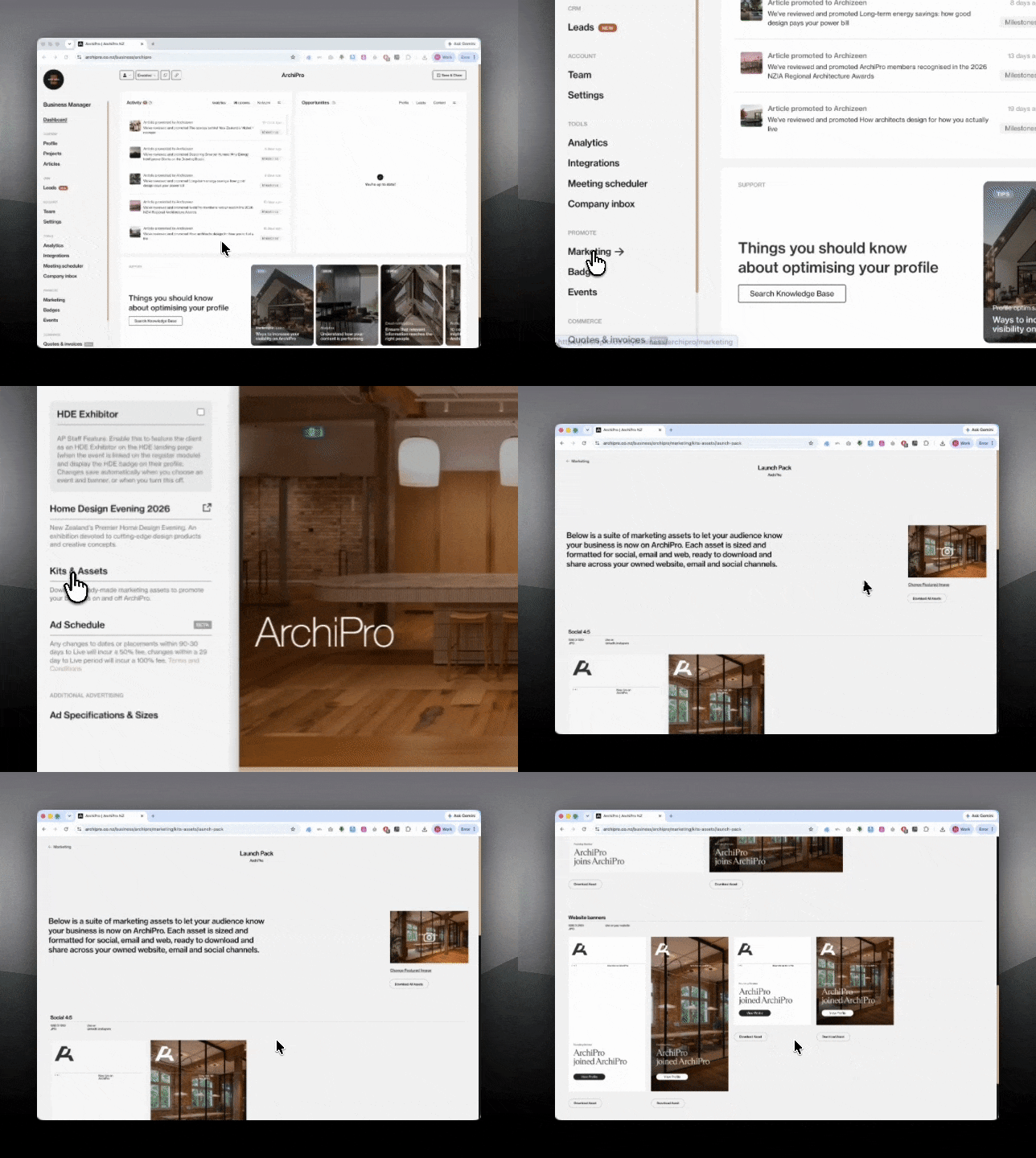
What’s included in your marketing kit
Your marketing kit includes a suite of ready-to-use assets designed to help you share that your business is now live on ArchiPro.
Each asset is sized for a specific channel, so you can download the version that best suits where you want to use it.
Social media assets
Social 4:5
Size: 1080 x 1350px File type: JPG
Best for: Instagram feed, LinkedIn feed and social posts where you want a taller visual format.
Use this when posting directly to your own social channels to let your audience know your ArchiPro profile is now live.

Social 19:11
Size: 1200 x 627px File type: JPG
Best for: LinkedIn, Facebook and wider-format social posts.
Use this when you want a cleaner horizontal format, especially for LinkedIn announcements or posts with a link back to your ArchiPro profile.

Website banners
Size: 1080 x 2160px File type: JPG
Best for: Your website, blog, news page or media section.
Use these assets if you would like to add a visual announcement to your own website, letting visitors know they can also explore your work on ArchiPro.

Email signature assets
Size: 1314 x 386px File type: JPG
Best for: Email signatures or outbound email communications.
Use this if you would like to add a simple ArchiPro profile announcement to your team’s email signatures or client-facing emails.

Suggested social copy
Choose from the suggested copy below and adjust it to suit your own tone of voice. Once you have selected your preferred version, add your ArchiPro profile link before publishing.
Tag ArchiPro in your post so we can see and reshare it where relevant.
LinkedIn: @archipro
Instagram: @archipro_
Option 1
We’re now live on @ArchiPro.
Our profile brings together our projects, practice information and the work that shapes how we approach residential design.
View our profile here:
[Insert your ArchiPro profile link]
Option 2
You can now find us on @ArchiPro.
Explore our projects, learn more about our practice and see the work behind our approach to considered residential design.
View our profile here:
[Insert your ArchiPro profile link]
Option 3
We’re pleased to share that our @ArchiPro profile is now live.
It’s a place to explore our work, understand our design approach and see the projects that define our practice.
View our profile here:
[Insert your ArchiPro profile link]
Option 4
Our work is now on @ArchiPro.
You can browse our profile, explore selected projects and connect with our team through the platform.
View our profile here:
[Insert your ArchiPro profile link]
Linking back to your ArchiPro profile
Where possible, include your ArchiPro profile link in your post, bio or first comment.
This helps your audience move directly from your social channel to your profile, where they can explore your work in more detail.
Updating your marketing kit imagery
Some marketing kit assets use imagery from your ArchiPro profile carousel.
To update the imagery:
- Go to your ArchiPro profile.
- Update your profile carousel images.
- Save your changes.
- Return to Marketing > Kits and Assets.
- Your assets will update using the latest imagery from your profile.
Needing more support?
If something does not look right, or you would like help checking your assets before posting, contact your strategic partnership directly.